Too Many Agents, Not Enough Terminals: Building the OMP Prompt Monitor
Several agents across several repos and no clear idea what any of them were doing. So I built a dashboard for omp sessions, and it accidentally handed me a readable decision log for every run.
📅 Wednesday, Aug 26, 2026
🔄 Wednesday, Aug 26, 2026
📖 Reading time: 9 min
I had four terminals open and no clear idea what three of them were doing.
One was part-way through a migration. One was grinding through a dependency sweep. One had been quiet long enough that I’d stopped checking it. The fourth I genuinely could not identify. Somewhere inside it was a prompt I’d written twenty minutes earlier that I needed to read again. The only copy of that prompt was in a scrollback buffer I had already scrolled past.
This isn’t a flaw in any particular agent. The harness I’ve been living in is Oh My Pi, or omp for short. It is very good at running a session. So is every other agentic CLI I’ve used. What none of them give you is the view across sessions: which repositories have work in flight, which agents are alive right now, and what on earth you asked them.
So I built that view. It’s called omp-prompt-monitor, it took a weekend, and it surfaced something I wasn’t looking for.
So where does it break?
Running one agent is a conversation. Running six is an operations problem, and it fails in a specific way: the useful context is split across terminal tabs, and scrollback is not a record you can search. There is no index, and once a line scrolls off the top of the buffer it’s gone. Think of a whiteboard that somebody wipes every few minutes.
Concretely, I kept needing to answer three questions and having no way to answer any of them:
- Which projects have work in flight? Not “which terminals are open”: which repositories currently have an agent doing something.
- Is this session alive, or did it finish an hour ago? A tab that last printed output at 09:12 tells you nothing about whether a process is still attached to it.
- What did I ask it? Especially the long, carefully-written prompts. Those are the expensive artefact in this workflow, and they were the easiest thing to lose.
omp already writes everything needed to answer all three. Every session appends a JSONL journal under ~/.omp/agent/sessions. Nobody was reading it.
One tab, three columns
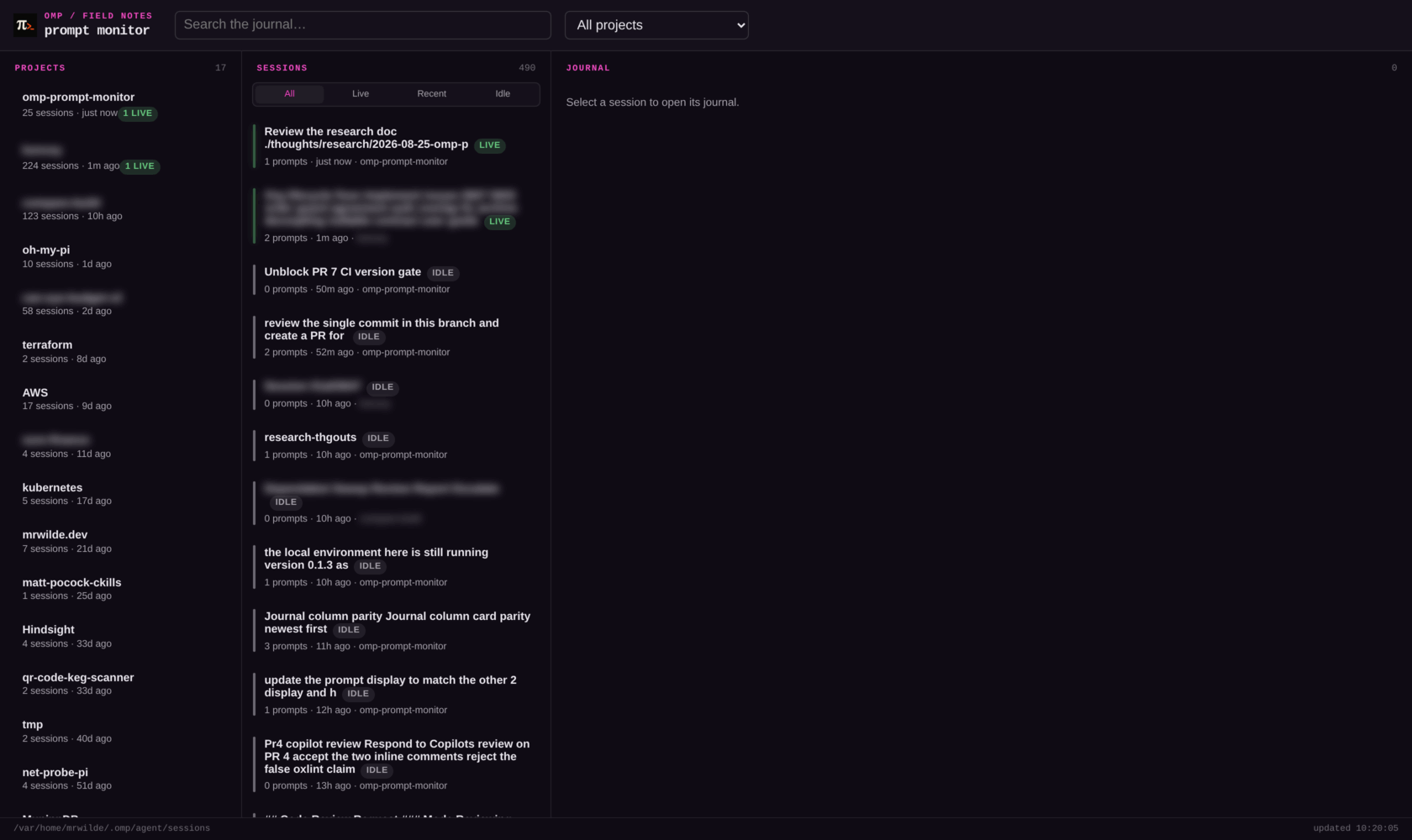
17 projects, 490 sessions, one tab. Client project names are blurred; every count is real.
Projects on the left, sessions in the middle, the selected session’s journal on the right.
That’s 17 repositories and 490 sessions on my machine, accumulated over a couple of months of using omp as a daily driver. It is also a fairly complete argument for why terminal tabs were never going to be enough.
Projects group by git root, falling back to working directory, so ~/work/api and ~/work/api/packages/db collapse into one card instead of two. Each card carries a session count, a relative last-activity time, and, when it applies, a live count.
Live, recent or idle: why did that need a heartbeat?
Question two turned out to be the interesting one, because you can’t answer it from the files alone. A journal’s mtime tells you when a session last wrote, not whether anything is still attached to it.
So the plugin half of the project writes a heartbeat: a small JSON file per session, refreshed every 20 seconds while the session runs, removed on shutdown. Anything older than 60 seconds is stale and gets cleaned up on read, which covers the case where omp is killed rather than exited.
That gives three honest states:
- live: a valid heartbeat exists; something is attached right now
- recent: no heartbeat, but the journal was touched within the last 15 minutes
- idle: everything else
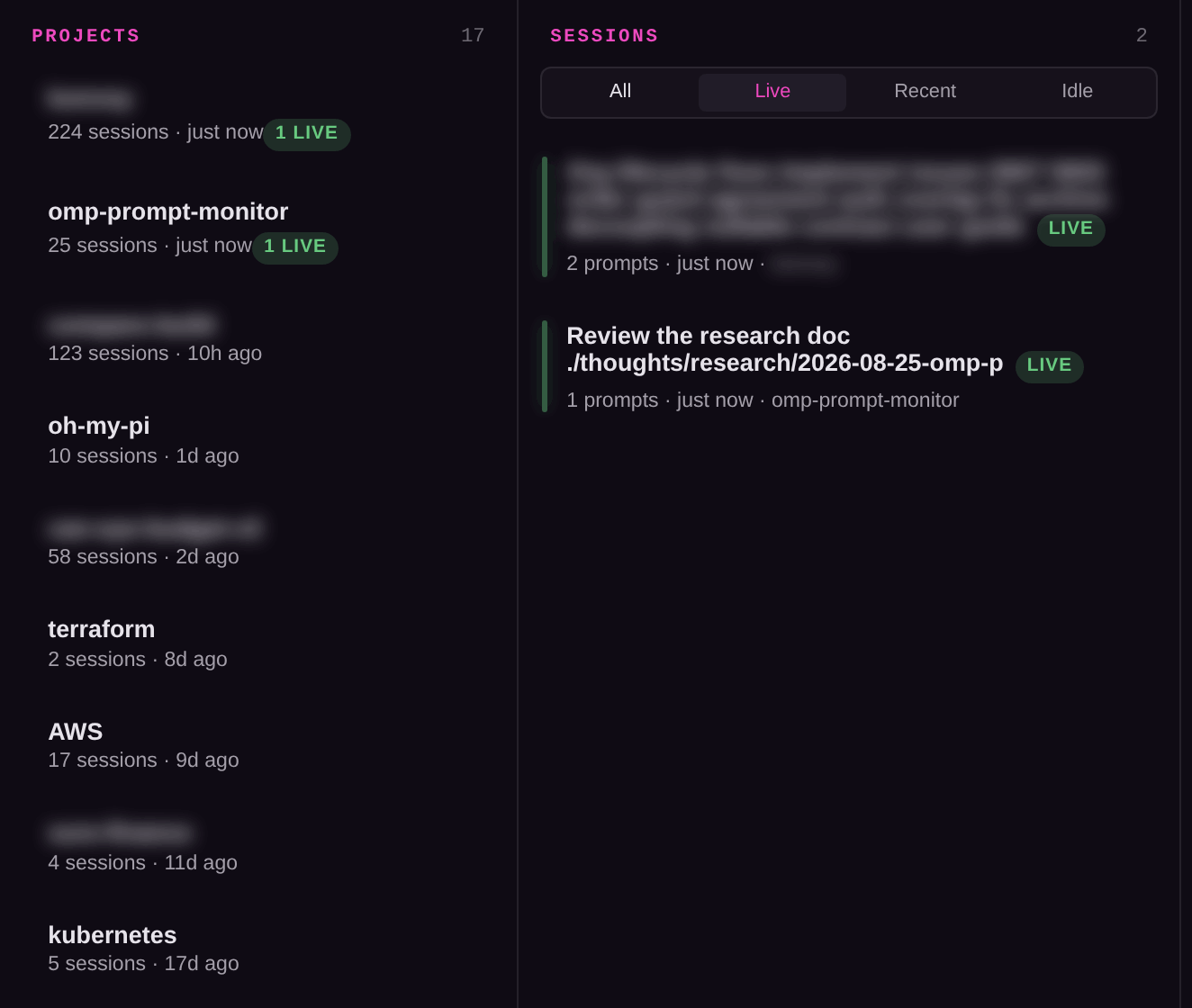
Two agents, two repos, both attached right now. Working that out used to mean cycling through tabs and guessing.
The journal: what did you type?
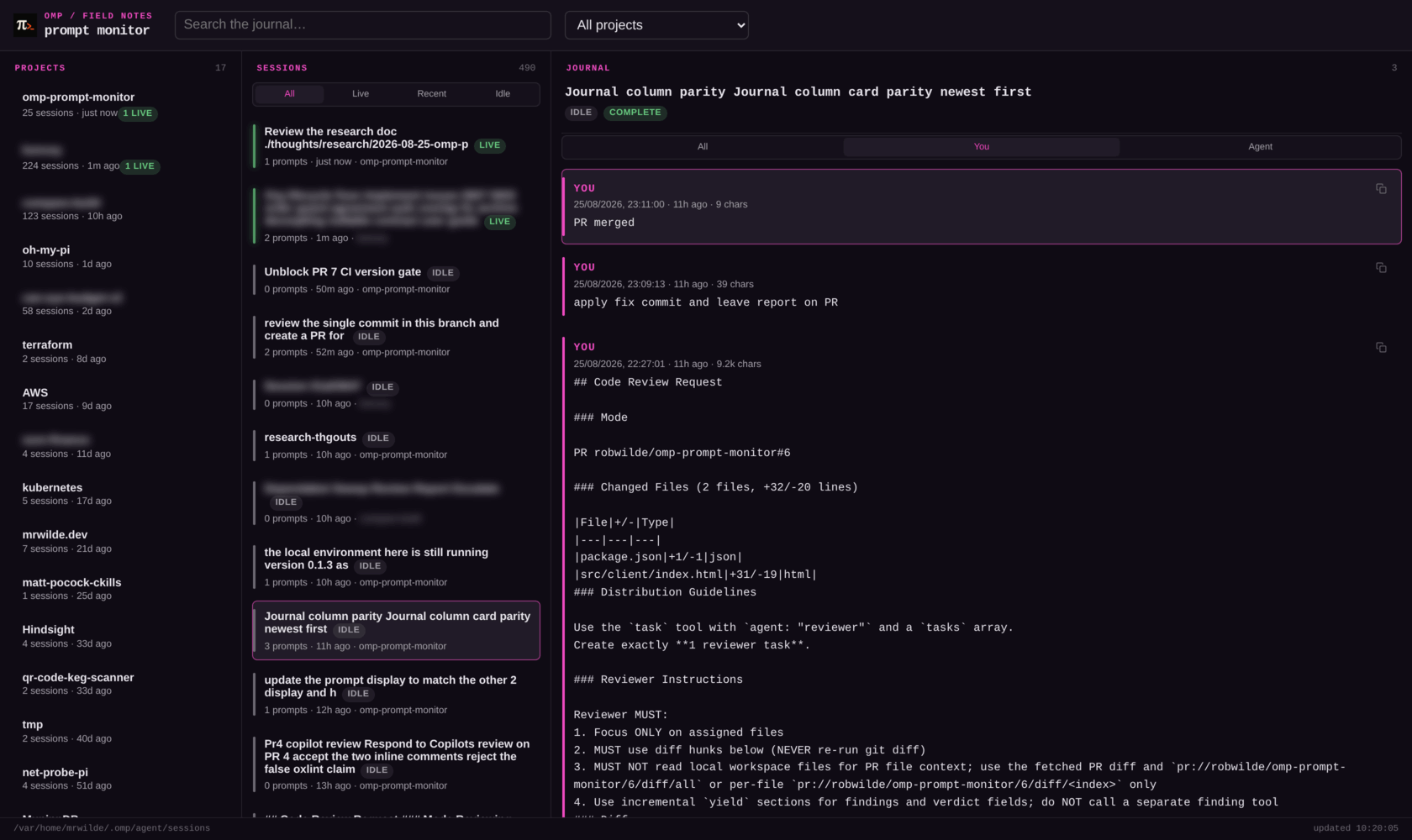
Three prompts, newest first: ‘PR merged’ at nine characters, a 39-character correction, and the 9.2k-character brief that started it. Each one copyable.
The You filter is the feature I originally set out to build: every prompt I typed in that session, newest first, timestamped, with a character count and a copy button.
The character counts are more useful than they sound. That session is three prompts: a 9,200-character code-review brief, a 39-character follow-up, and PR merged, all nine characters of it. You can see the shape of a session before reading a word of it.
Getting that list clean took more filtering than I expected. A harness doesn’t only record what you type. omp also writes synthetic messages, steering messages, and user-role entries attributed to an agent rather than to me. All of those are legitimately part of the conversation, and none of them are things I typed, so the parser drops them. What’s left under You is only ever me. Skill invocations survive as their own tagged entry kind, because those are things I chose to run.
The side effect: reading the agent’s running commentary
Here’s the part I didn’t plan.
Once the parser understood user messages, adding assistant messages was about ten lines: any assistant turn carrying non-empty text becomes a journal entry. I expected that to give me the final answers: the summary at the end of a task.
What it gives you is everything the model says between tool calls.
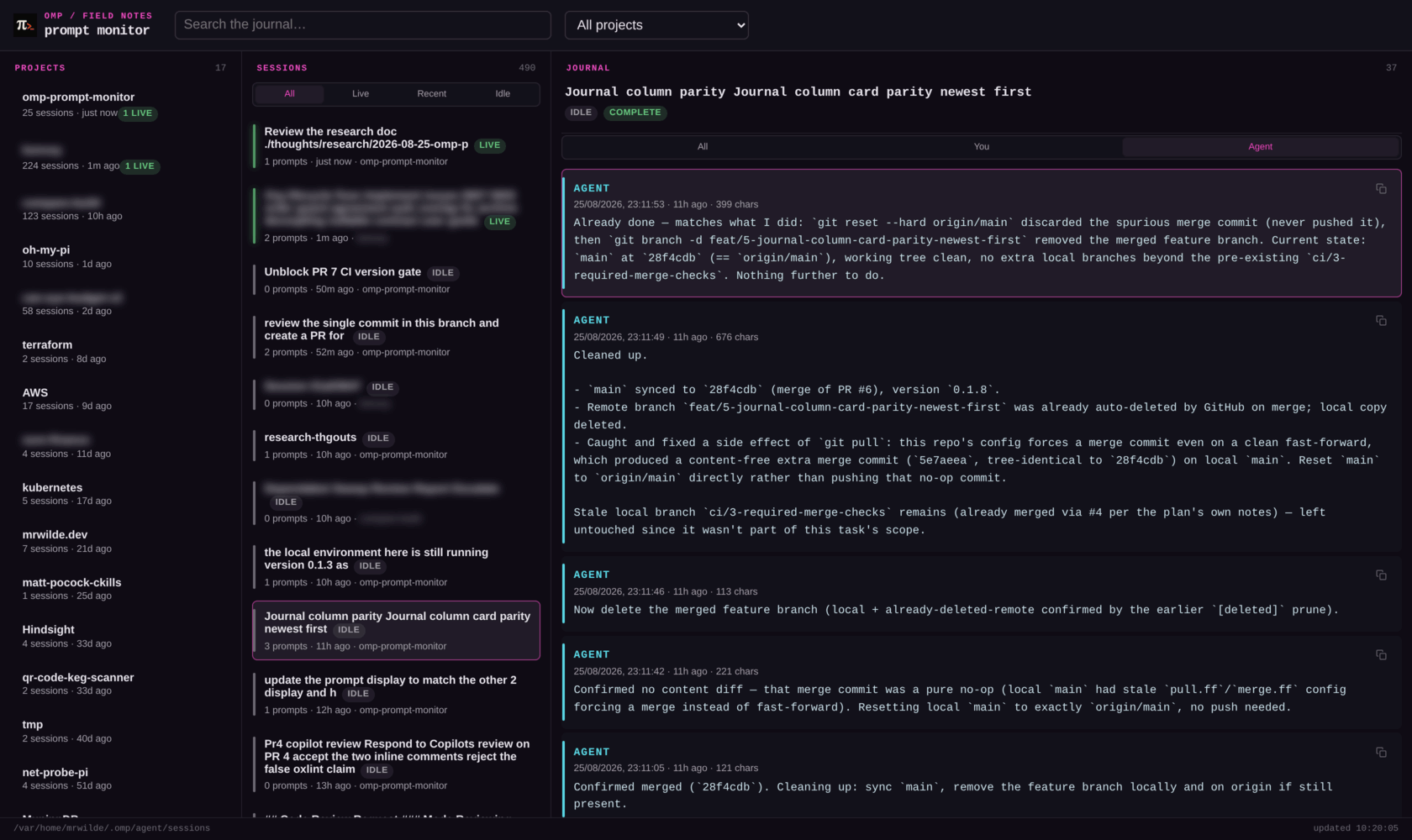
Same session, Agent filter: 3 entries become 37. This is the commentary that normally scrolls past between tool calls.
Switch that same session to Agent and it goes from 3 entries to 37. Most of them are tiny:
Now verify with CI gates and commit.(36 chars)
All green. Commit and push.(27 chars)
Confirmed merged (`28f4cdb`). Cleaning up: sync `main`, remove the feature branch locally and on origin if still present.(121 chars)
In the TUI those flash past between tool calls and then they’re gone. Sitting still, timestamped, filtered to one role, they read as a decision log: the agent narrating its own plan, one step at a time. And because every entry is timestamped, you can see where a run spent forty minutes and where it spent four seconds.
I’ve found this more useful for debugging a bad run than the final summary is. When an agent goes sideways, the summary tells you where it ended up; the narration tells you the exact step where it decided to go there. That third line up there (121 characters naming the merged commit and the exact cleanup that follows) is a whole decision I’d otherwise be reconstructing from git reflog.
It has also quietly changed how I write prompts. Reading fifty of these back, the good runs and the bad runs diverge at a visible point, and it’s almost always the point where the model restated my request slightly wrong and I wasn’t watching closely enough to catch it.
Finding the thing you half-remember
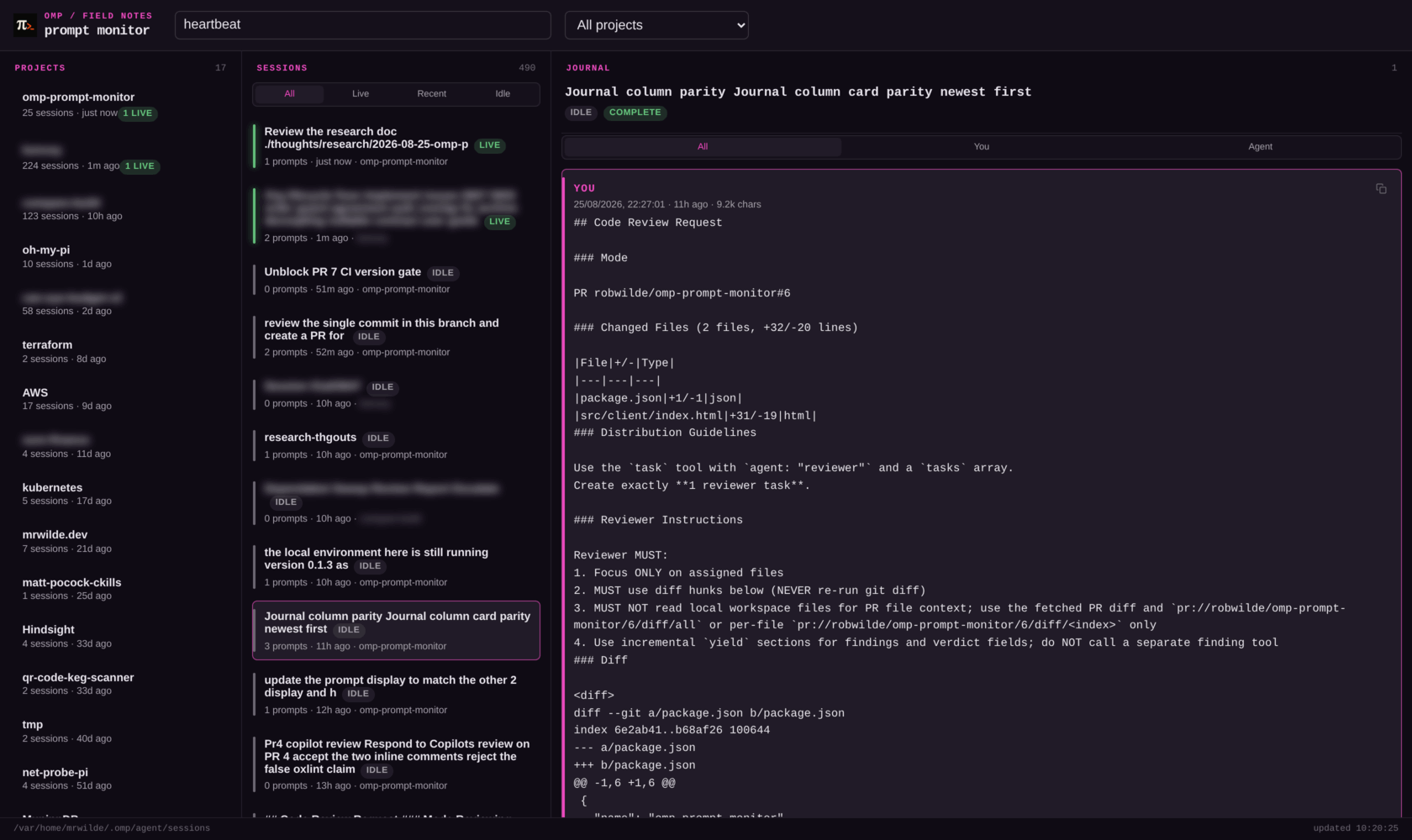
Search narrows the journal only (40 entries down to 1), leaving the project and session lists exactly where you left them.
Search filters journal entries inside the selected session: 40 entries down to the one that mentions heartbeat. That narrow scope is the whole point. It doesn’t touch the project or session lists, so you keep your place while you dig.
How it works
The pipeline is one-way and boring, and that is the idea:
journal.ts          index-store.ts        view.ts               server.ts
parse one      →   incremental index  →  snapshot          →   HTTP + JSON API
.jsonl file         (size + mtime)        (+ git, heartbeats)
Each file starts with an optional title-slot record, then a session header. Malformed JSON lines are counted, not thrown: one truncated journal from a hard kill must never take down the whole index. Titles fall back through: explicit title slot → header title → first 60 characters of the first prompt → Session <id8>.
The scan globs exactly one directory level (*/*.jsonl). There is a reason for that. omp writes subagent journals into nested trees, and pulling those in would bury the sessions you started under fan-out noise.
Entries are cached by size and mtime, so refreshing across 490 sessions only re-reads the handful that changed, with a bounded worker pool rather than 490 concurrent file reads. The cache never stores assistant replies. Prompts are small and needed for the list view, replies are large and only needed for the one session you have open, so they’re re-parsed on demand.
Privacy lives in the route, not the model. The list view polls /api/snapshot every 10 seconds, and that endpoint strips prompt text from every session before responding. Full text only ever comes back from /api/session/:id, one session at a time. The server binds 127.0.0.1, and passing --host is a choice to make with your eyes open, because the detail endpoint and --json will hand full prompt history to anyone who can reach them.
Instance reuse happens without a PID file. Every response carries an x-omp-monitor: 1 header, so a second omp-monitor or a second /monitor probes /healthz for that header first and reuses the running dashboard instead of fighting over the port.
The entire frontend is one static HTML file: inline CSS, vanilla JS, no framework, no build step. Prompt text goes into <pre> via textContent, never innerHTML, because arbitrary transcript content is exactly the sort of thing you don’t want parsed as markup. Bun runs the TypeScript directly, so there are no runtime dependencies and nothing to compile.
Running it
Run it standalone:
curl -fsSL https://get.mrwilde.dev/setup | bash

omp-monitor                       # http://127.0.0.1:7333
omp-monitor --port 8080 --open
omp-monitor --json > snapshot.json
The plugin version is the one you want, because it writes the heartbeats that make live mean anything. Run it as an omp plugin:
omp install github:robwilde/omp-prompt-monitor
Restart omp afterwards. Newly installed extensions need a real restart; /reload-plugins won’t rebuild them. Then run /monitor in any session: it starts the dashboard if one isn’t already up and reports the URL. /monitor stop, /monitor restart, and /monitor update do what they say.
Needs Bun 1.3.14 or newer. The installer will put a user-scoped Bun in place if you don’t have one.
What I’d change
Subagent trees are invisible. A task fan-out spawning six subagents still shows as a single session. That’s the right default, because the alternative is a list nobody can read. But “expand this session’s subagents” is the obvious next thing to build.
It’s read-only. I can see that a session has been sitting idle for forty minutes; I can’t do anything about it from the browser. Steering an agent from a dashboard is tempting and probably a mistake, but I keep thinking about it.
One machine. The snapshot is plain JSON and the boundary was drawn so a remote collector could slot in, but none exists yet. Running agents on a box in the corner and watching them from a laptop is the version of this I actually want.
Four merged PRs and a weekend. It hasn’t made my agents any better, but I stopped losing prompts, I can tell at a glance which repos have something running, and I’ve accidentally acquired a decision log for every run I’ve ever done.
The code is at robwilde/omp-prompt-monitor. It reads files omp already writes, so there is nothing to configure. If you are running more than one agent at a time, point it at your own sessions and have a read of what your agents have been telling you. And if it breaks, or you find something sitting in those journals that I haven’t thought to surface yet, open an issue and tell me about it. I would genuinely like to know.